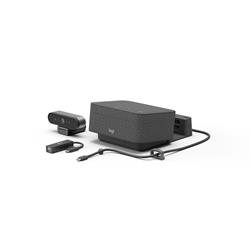
Video collaboration for small meeting spaces, private rooms, and focus rooms. Features clear audio, pro video, one touch meetings, simple installation, & more.
Pop into a focus room, connect a laptop, and start an instant meeting
INSTANT MEETINGS WITHREADY-TO-GO SOLUTION
Logi Dock Focus Room Kit brings video collaboration to individual meeting spaces, focus rooms, and phone booths. No need to install drivers. Connect the single USB-C cable to your laptop Logi Dock works with laptops that support USB-C with DisplayPort Alt Mode for an instant meeting with professional-quality audio and video - and power the laptop up to 100W at the same time
SIMPLE TO INSTALL
Ensure clean, confident installs of Logi Dock with secure cable retention
READY FOR BUSINESS
Logi Dock Focus Room Kit works seamlessly with common calling applications across most platforms and operating systems. Products included in the kit have business certifications such as Microsoft Teams, Zoom, Google Meet, Google Voice, and work with other popular applications like Cisco Webex, BlueJeans, and GoTo Meeting. It's super easy for employees to use with less stress for IT
OPTIMIZE PERFORMANCE WITH LOGI TUNE
For truly optimal performance, employees can download the Logi Tune desktop app or IT can provision it to their laptops. Logi Tune allows individuals to customize and save settings for the webcam and Logi Dock, take advantage of calendar integration Logi Tune desktop app required for calendar integration, which supports Office 365 and Google Calendar. to instantly join meetings, and control the audio and camera at their fingertips
PRODUCTIVITY EVERYWHERE
Logi Dock is elegantly designed for any modern workspace, whether that's a focus room, a private office, or an employee's desk at home. By simplifying office setup and reducing desktop clutter, Logi Dock enhances productivity for hybrid workers
Specifications
Summary
Product Description
Logitech Logi Dock Focus Room Kit - video conferencing kit
Device Type
Video conferencing kit
Kit Content
Logitech Logi Dock, Logitech BRIO Ultra HD Pro Webcam
Video Input
Digital camera - SuperSpeed USB 3.0
Audio Input
6-microphone array - beamforming
Audio Output
Speaker(s)
Input Device
Control buttons
Networking
Bluetooth
Software Certification
Optimised for UC
System Requirements
Windows 10 or later, Apple macOS 11 or later, Google Chrome OS, Apple iOS, Android
Manufacturer Warranty
2-year warranty
Detailed Specification
General
Device Type
Video conferencing kit
Kit Content
Logitech Logi Dock, Logitech BRIO Ultra HD Pro Webcam
Dimensions & Weight Details
Docking station with bracket - Width 16 cm Depth 20.7 cm Height 8.8 cm Weight 1.095 kg , Web camera - Width 10.2 cm Depth 2.7 cm Height 2.7 cm Weight 63 g
Video Input
Type
Digital camera (colour) - external
Interface Type
SuperSpeed USB 3.0
Digital Video Capture Resolution
4096 x 2160, 1920 x 1080, 1280 x 720
Video Modes
4K, 1080p, 720p
Digital Zoom
5
Features
90° diagonal field of view, 82.1° field of view (horizontal), 52.2° field of view (vertical), RightLight 3 technology, High Dynamic Range (HDR), 13 megapixels resolution, Auto Focus, glass lens, noise-cancellation, 4K ULTRA HD engine, Windows Hello compatible
1 x audio / video - HDMI , 1 x audio / video - DisplayPort , 2 x USB 3.1 Gen 1 - 9 pin USB Type A , 3 x USB 3.1 Gen 1 - 24 pin USB-C , 1 x USB-C Upstream with Power Delivery (100 W)
Miscellaneous
Cables Included
1 x USB to USB-C cable - 2.2 m , 1 x USB-C cable - 1 m
Included Accessories
Mounting bracket, cable management hardware, USB-C cable tidy kit, USB-C cable, USB to USB-C cable, USB-C to Ethernet adapter, privacy shutter
Software Certification
Optimised for UC
Compliant Standards
Plug and Play, DisplayPort 1.4
Power
Power Device
Power adapter - external
Software / System Requirements
OS Required
Windows 10 or later, Apple macOS 11 or later, Google Chrome OS, Apple iOS, Android