



Introducing the NEW Belkin Network USB Hub, giving you the ability to share your printers and multimedia files - wirelessly*
- With a reliable and easy to set-up built-in printserver
- Wireless access to printers, USB devices, MP3's, images & more
- Works with any existing wired or wireless network*
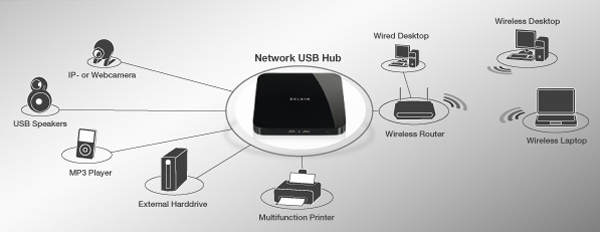
Works with all wireless and wired routers
* Network router required - The Network USB Hub stacks with Belkin's N Wireless Router to save space.
Share printers & multimedia files on your network
- Connect and access up to 5 USB devices via the Network USB Hub
- Share devices such as multifunction printers, media readers and scanners with anyone on your network
- Play and transfer music from any external harddrive or MP3 player connected to the Network USB Hub
- Back up to and access data from external harddrives, USB flash drives and other USB storage devices
- Reliable and easy-to-use print server: the Network USB Hub enables your computer to access printers as if they are directly attached to the computer
- Works with any (wired or wireless) router; devices can be accessed from any computer on the network*
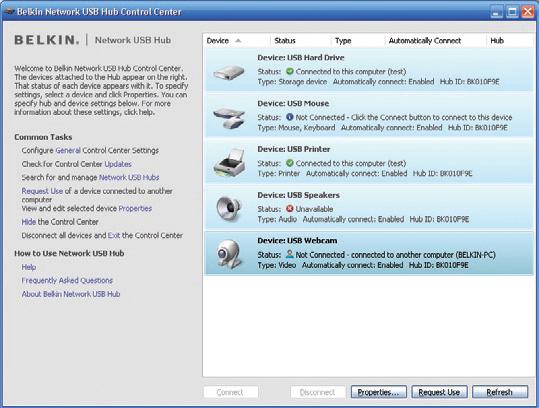
Manage & view your USB devices on the "Control Center"
FAQs
How does it work?
The Belkin Network USB Hub works by installing software that makes devices appear to be connected directly through each computer's USB ports.
Which devices does the Belkin Network USB Hub support?
The Hub is designed specifically for printers and mass-storage devices. It also works for most other USB devices, including most standard webcams, keyboards and mice, multifunction machines, scanners, and media readers. Please note: some high-speed isochronous devices, such as high-definition webcams and video docking stations, may not be compatible with the Hub.
How does the Belkin Network USB Hub support multiple users?
The convenience of direct USB-connection emulation requires that only one user be linked to each device at a time. To make this seamless for printers, the Hub automatically disconnects users after sending a print job, so that other users can print. For other devices, the software allows users to contact others on the network to request that they disconnect from a device.
Is the Belkin Network USB Hub compatible with any network?
Yes. However, keep in mind that the quality of the connection of a computer to the devices on the Hub depends upon the speed of the wireless network.
Can I use other USB hubs on the Network USB Hub?
Yes. The Hub allows you to "daisy-chain" other USB hubs. The driver supports a total of 15 connections at a time on the Hub.
How do firewalls impact the Network USB Hub?
If users have the Windows firewall activated, the Network USB Hub will automatically detect this and ask the user if he or she wishes to allow the Hub to work from behind the
firewall. Users of other firewalls must manually add the device driver to their list of allowed programs, allowing the Hub to work.
Will the Network USB Hub work with a computer on a Virtual Private Network (VPN)?
No. The Network USB Hub requires VPNs to be turned off in order for it to function.
*High-speed isochronous devices (such as high-definition webcams and video docking stations) may not be compatible with the Network USB Hub.
**Distance limitation depends on the range of your wireless router
